Your words, written in seconds

Your brand has a voice.
openfield helps you use it.

You shouldn't have to spend an hour wrestling with AI just to post something. openfield learns your brand once — and from that point on, every caption, hashtag, and content plan sounds exactly like you. No prompting. No guessing. Just your words, ready when you are.

5 free generations every day. No credit card required.

Real results
Tracie N., @supercalitravels
Tracie N.
@supercalitravels
Disney Travel Agent · Just Off Harbor
0 → 250 followers in one week

"openfield has been so easy to use. I started with the Bio Writer and that helped me start my travel business. I use it every day for post ideas and content planning."

Bio Writer Post Idea Generator Content Calendar

A real openfield user. Individual results vary.

Built-in tools

Everything you need to show up consistently.

The tools that used to take an hour now take seconds. And because openfield knows your brand, you never start from scratch.

Caption generator

Write 3 scroll-stopping captions tailored to any platform in seconds.

Hashtag strategy

Get a complete hashtag set — broad reach and niche gems — for any topic.

Content calendar

Plan a full week or month of posts in minutes with one simple prompt.

Bio writer

Three polished bio options for every platform, fitted to your brand voice.

Post Idea Generator

Tell openfield your platform and goal and get a full list of post ideas — ready to take straight into the Caption Generator.

Brand voice builder

Define your brand's voice once, and every tool writes more like you from then on.

Pricing

Start free. No pressure.

Try openfield free and see how it feels. When it saves you time — and it will — upgrading is easy.

Free
$0/mo

Try the AI engine free — no credit card needed.

  • 5 AI generations per day
  • Caption Generator
  • Bio Writer
  • No credit card needed
About

You built something worth talking about.

openfield was built for anyone who wants to grow on social media — but doesn't have the time, patience, or skillset to figure it all out. Whether it's writing captions that actually sound like you, finding the right hashtags, planning a month of content, analyzing what's working, or building a bio that converts — openfield handles it all, right here, in seconds.

openfield was built for people who have better things to do than spend an hour prompting an AI. You tell us about your brand once — your voice, your audience, what you care about — and openfield remembers. Every caption, every hashtag, every content plan sounds like it came from you. Because it did.

Whether you're a small business owner, a creator, a side hustler, or someone just trying to show up more consistently — openfield gives you your time back. No learning curve. No prompting experience needed. Just your brand, sounding like itself.

No AI experience needed. No complicated setup. You show up, tell us about your business, and openfield handles the rest. It's not magic — it's just a tool that was built to actually fit into your life.

As we grow, so will the toolset — more tools, more capabilities, more ways to help your business show up. If you're here now, you're here early, and that means something.

Glad you found us.

What we believe

Your time is valuable

Every decision we make starts with one question — does this save the user time? If not, it doesn't belong here.

AI that knows you

Generic AI gives generic output. openfield is different because it learns your brand and writes like it's been on your team for years.

Built with you

openfield grows based on what users actually need. If there's something missing, we want to hear about it.

Services

The right words, right when you need them.

Every tool in openfield is built around one idea — your brand has a voice, and you shouldn't have to fight to find it. Fill in a few details, and openfield writes content that sounds like you every time.

01

Caption generator

Describe your post, choose your tone and platform, and openfield's AI generates three ready-to-post captions instantly — right here on the page.

02

Hashtag generator

Type in your niche and platform, and get a complete hashtag set generated on the spot — broad reach tags, niche gems, and a ready-to-copy full pack.

03

Content calendar builder

Fill in your brand details and openfield builds you a complete content calendar — post types, topics, and optimal timing — generated in seconds inside the app.

04

Profile bio writer

Tell us who you are and what you do, and openfield writes three platform-fitted bio options for you — character limits handled automatically.

05

Post Idea Generator

Out of ideas? Tell openfield your platform, your goal, and any upcoming events — and it returns a full list of post concepts ready to take straight into the Caption Generator.

06

Brand Voice Builder

Define your brand's voice once — openfield analyzes how you sound and saves it, so every tool writes more like you from then on. Your sharpest, most on-brand output yet.

On the roadmap

We're just getting started.

We're actively building new tools based on user feedback. If there's something you'd love to see in openfield, reach out — you help shape what gets built next.

In research

Email marketing prompts

Newsletters, welcome sequences, and promotions — done with AI.

In research

Ad copy generator

Ready-to-run copy for Facebook, Instagram, and Google ads.

In research

What would you like to see?

We build what users actually need. Reach out and tell us what's missing.

Contact

We're real people. Say hello.

Have a question, a idea, or just want to tell us how it's going? We read every message and respond within one business day. openfield is built on feedback from real users — your voice matters here.

Quick answers.

Do I need my own AI account or subscription?

No. openfield has AI built right in — you never need a ChatGPT, Claude, or Gemini account. Everything runs inside this website.

How many generations do I get?

Free accounts get 5 generations per day. Paid plans range from 10 to 100 per day depending on your tier. No credit card needed to start.

Can I cancel my subscription?

Yes, any time. No contracts, no questions asked. You keep access until the end of your billing period.

I'm not tech-savvy. Will this work for me?

Absolutely — openfield is built for exactly that. You fill in a few fields describing your business and hit generate. The AI does the rest. No tech knowledge needed.

Do I need to know how to use AI?

Not at all. openfield handles all the AI complexity behind the scenes. You just describe your business and what you need — we handle everything else.

5 generations left today
Upgrade for more →

You've used your 5 free daily generations.

Upgrade to keep creating. Upgrade to keep creating — plans start at just $5/month.

Your free generations reset every day at midnight.

Caption Generator

Describe your post, pick a platform and tone, and get three ready-to-use captions in seconds.

  Your captions will appear here

Bio Writer

Get three polished bio options tailored to your platform's character limit and your brand voice.

  Your bio options will appear here

Hashtag Generator

Build a complete strategic hashtag set — broad reach tags, niche gems, and a ready-to-copy pack.

This tool is included with Starter

Upgrade to the Starter plan (from $5/month) to unlock the Hashtag Generator and start building strategic hashtag sets in seconds.

  Your hashtag set will appear here

Content Calendar Builder

Plan a full week or month of posts with content types, topics, and optimal posting times.

This tool is included with Pro

Upgrade to the Pro plan (from $15/month) to unlock the Content Calendar Builder and plan your whole month in one click.

  Your content calendar will appear here

Brand Voice Builder

Define your brand's voice once — openfield analyzes how you sound and saves it so every tool writes more like you.

This tool is included with Pro

Upgrade to the Pro plan (from $15/month) to unlock the Brand Voice Builder and sharpen every tool's output to sound exactly like your brand.

  Your brand voice profile will appear here

Post Idea Generator

Out of ideas? Tell openfield your platform and goal and get a full list of post concepts — ready to take into the Caption Generator.

This tool is included with Growth

Upgrade to the Growth plan (from $9/month) to unlock the Post Idea Generator and never stare at a blank calendar again.

  Your post ideas will appear here
See it work

openfield, in action.

No mockups, no maybes — real screen recordings of openfield writing content in a brand's voice. Slide through to watch each tool do the work, then see the full toolkit below.

See it in action

Watch openfield do the work.

Real screen recordings — pick a tool, fill a quick form, and get content in your brand's voice.

Caption Generator

Three captions, ready to post.

Describe your post, choose a platform and tone, and openfield writes three scroll-stopping captions — already in your brand's voice, no prompting required.

Fill a quick form → Generate → Copy and post.
Bio Writer

A bio that sounds like you.

Tell openfield who you are and what you do. It returns three polished bio options fitted to your platform's character limit — sharp, on-brand, and ready to paste in.

Describe your brand → Generate → Pick your favorite.
Content Calendar Builder

A month of posts in one click.

Give openfield your platform, focus, and goal, and it maps out a full week or month — content types, topics, and the best times to post — all in seconds.

Set your goal → Build → Follow the plan.
And openfield doesn't stop there

A full content toolkit, not just captions.

Everything above uses one learned brand voice — the same voice powers these tools too.

Post Idea Generator

Never stare at a blank page. Tell openfield your platform and goal, get a full list of ready-to-write ideas.

"Behind-the-scenes latte art tutorial — Reel, high engagement format."
Content Calendar Builder

Plan a full week or month in one click — content types, topics, and posting times all mapped out.

"Mon: educational · Wed: behind-the-scenes · Fri: customer feature"
Brand Voice Builder

The tool behind all the others. Define your brand's voice once, and every tool above writes more like you from then on.

"Your voice: warm, a little witty, never corporate."

Now imagine it knowing your brand.

Set up your brand once, and every caption, bio, and post comes back sounding like you — in seconds.

Free to start. No credit card required.

Pricing

Straightforward pricing.
Cancel any time.

Start free and upgrade as your business grows. Every plan includes openfield's built-in AI engine. Upgrade for more daily generations and more tools.

Free
$0
/mo

Try openfield free — no credit card needed, cancel any time.

5 generations/day~150/month
  • Caption Generator
  • Bio Writer
  • Hashtag Generator
  • Post Idea Generator
  • Content Calendar
  • Brand Voice Builder
Starter
$5
/mo

For small businesses ready to show up consistently online.

10 generations/day~300/month
  • Caption Generator
  • Bio Writer
  • Hashtag Generator
  • Post Idea Generator
  • Content Calendar
  • Brand Voice Builder
Pro
$15
/mo

For power users and those managing multiple accounts or clients.

100 generations/day~3,000/month
  • Caption Generator
  • Bio Writer
  • Hashtag Generator
  • Post Idea Generator
  • Content Calendar
  • Brand Voice Builder
Compare plans

Everything side by side.

A full breakdown of what's included at each tier.

Feature Free Starter Growth Pro
Generations
Daily generations 5 10 100
Monthly estimate ~150 ~300 ~3,000
Tools
Caption Generator
Bio Writer
Hashtag Generator
Post Idea Generator
Content Calendar
Brand Voice Builder
Priority access to new tools
Support & access
New tools every month
Email support
Priority support
Cancel any time

openfield should earn your trust first.

Start free. Upgrade when it's saved you enough time to be worth it. Cancel any time — no questions asked.

Questions

Good to know.

What counts as a generation?

Every time you click "Generate" in any tool, that uses one generation. It doesn't matter how long or short the output is — each click is one generation.

Do unused generations roll over?

Daily limits reset every 24 hours. Unused generations don't carry forward — but in practice most users don't come close to their daily limit.

Can I switch plans any time?

Yes. Upgrade or downgrade whenever you like. If you upgrade mid-month, you're billed the difference. If you downgrade, the change takes effect on your next billing date.

Do I need a credit card to start free?

No. The free plan is genuinely free — no card required, no trial that auto-converts. Upgrade when you're ready.

What happens when I hit my daily limit?

You'll see a friendly message letting you know your generations have reset the next day. You can also upgrade at any time to get more immediately.

Is there a discount for annual billing?

Yes — pay annually and save 20% across all paid plans. Toggle between monthly and annual at the top of this page to see the annual pricing.

openfield

Marketing that doesn't feel like work.

Welcome back

Sign in to access your brand profile and tools.

Forgot password?
or

Don't have an account? Create one free

← Back to openfield

Legal

Terms of Service

Last updated: June 29, 2026

Plain English summary

openfield is an AI content tool. You own what you create with it. We're not liable if AI-generated content doesn't perform as expected — always review before publishing. Disputes go to arbitration, not court. You can cancel any time.

Legal

Privacy Policy

Last updated: June 29, 2026

Plain English summary

We collect your email, brand profile info, and usage data. We never sell your data. Payments go through Stripe — we never see your card number. Your AI prompts are processed by Anthropic to generate content. You can delete your account any time.

Install the app

Put openfield on your home screen.

openfield installs like a regular app — no App Store needed. It opens full screen and lives right on your device. Takes about 15 seconds.

1

Open openfield in Safari

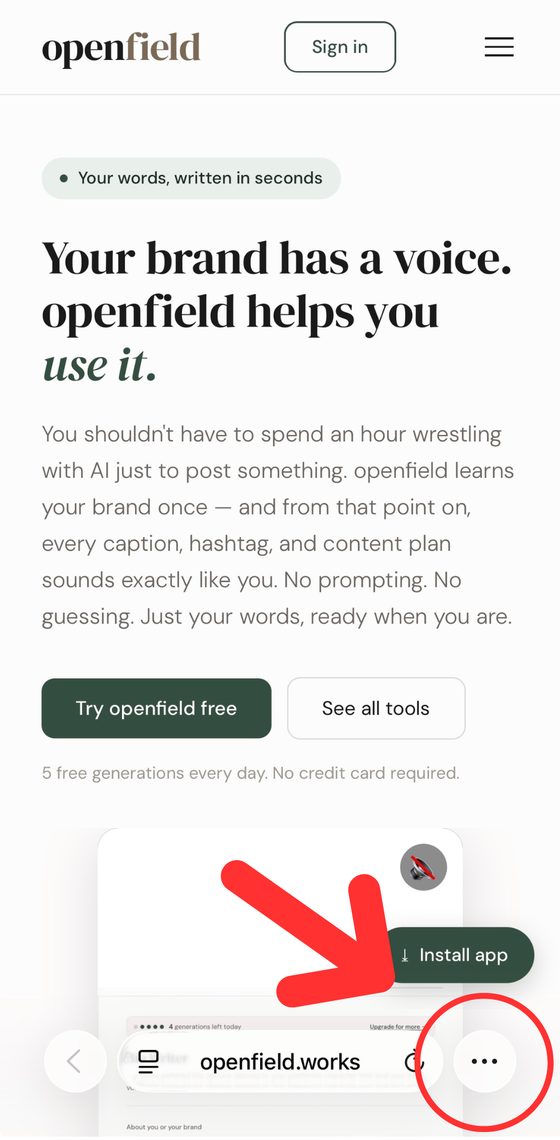
Make sure you're using the Safari browser on openfield.works, then tap the menu button (⋯) at the bottom-right.

Tap the menu button in Safari
2

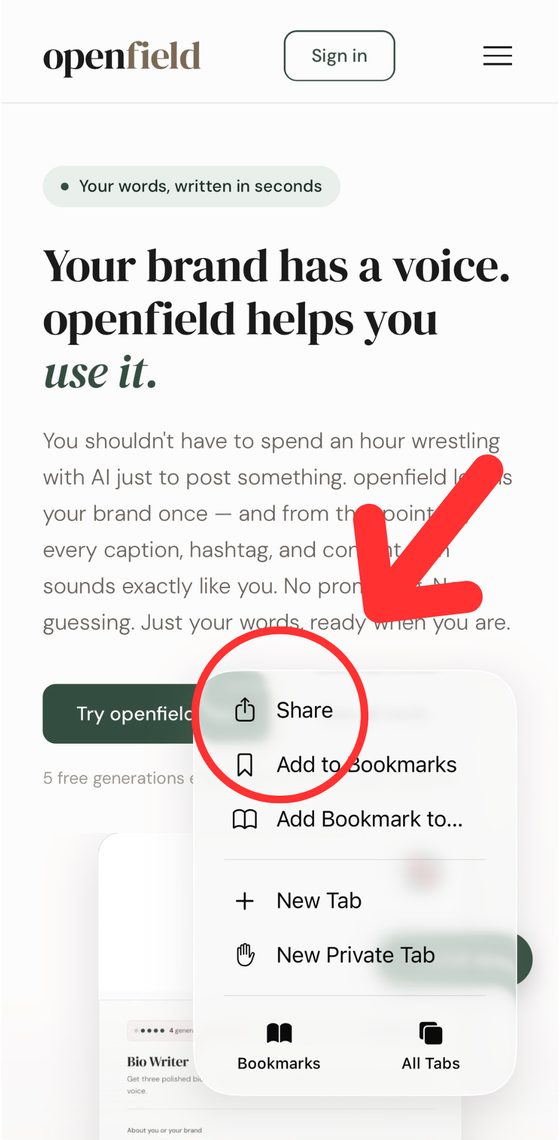
Tap "Share"

In the menu that pops up, tap the Share option at the top.

Tap Share
3

Tap "Add to Home Screen"

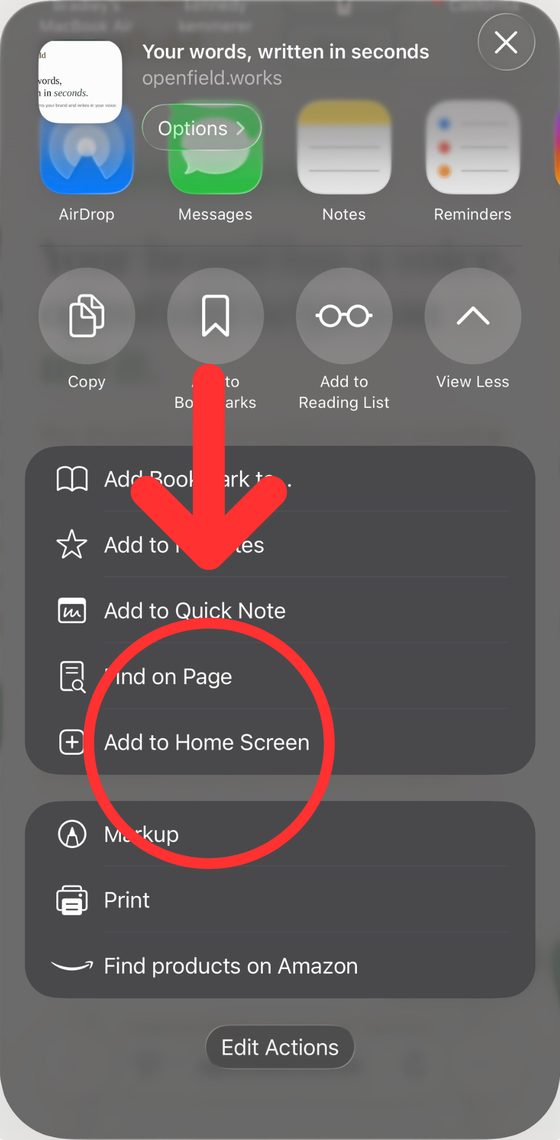
Scroll down the share sheet and tap Add to Home Screen.

Tap Add to Home Screen
4

Tap "Add"

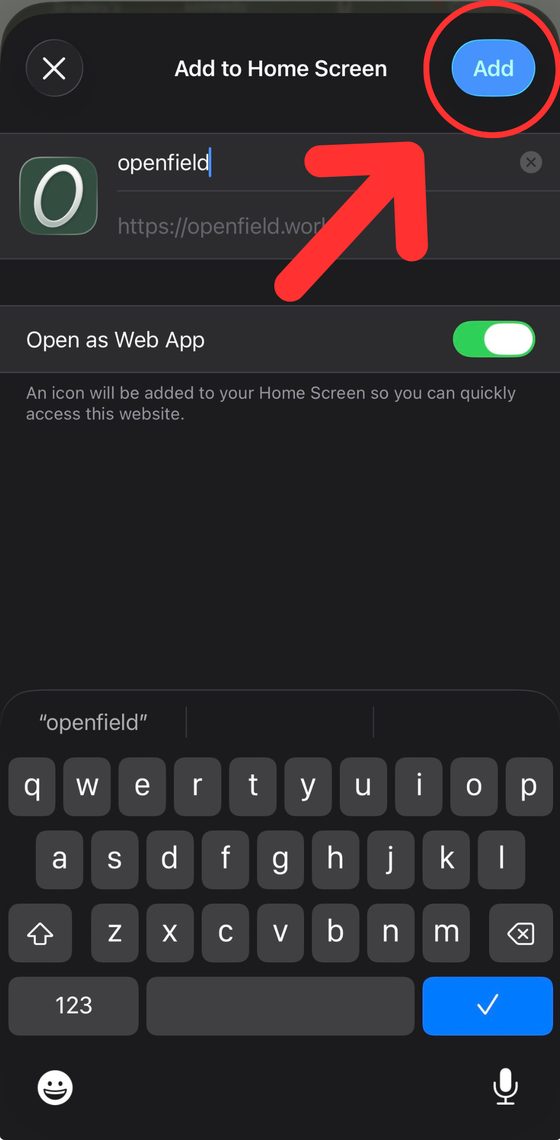
Leave "Open as Web App" on, then tap Add in the top-right. The openfield icon appears on your home screen — tap it any time to open the app.

Tap Add to finish

One click in your browser

In Chrome or Edge on your computer, look for the install icon on the right side of the address bar (a small screen with a down arrow) and click it — or use the green Install app button on the site. In Safari on Mac, use File → Add to Dock. openfield then opens in its own window like a desktop app.